What is Debug Log in salesforce
Updated 14 October 2025
A debug log records data base operations, system process, and errors that occur when executing a transaction or while running unit tests. We can monitor specific users in log by adding them to list of Monitored Users.
Debug Log Details:
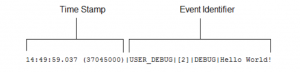
A salesforce debug log includes a header, execution units, code units, log lines, and other log data
- Timestamp: Consists of the time when the event occurred and a value between parenthese.
- The time is in the user’s time zone in the format HH:mm:ss.SSS.
- Nanoseconds since the start of the request
- Event Identifier: Specifies the event that triggered the log entry
- Method name
- The line number where the code was executed
- log data
The following information is monitored by Logs:
- Database changes
- HTTP callouts
- Apex errors
- Resources used by Apex
- Automated workflow processes, such as:
- Workflow rules
- Assignment rules
- Approval processes
- Validation rules
Levels:
You can also specify one of the following logging levels, The levels are listed from lowest to highest
NONEERRORWARNINFODEBUGFINEFINERFINEST
These levels run from lowest to highest and are cumulative. So if you pick the finest level, you get all messages that are logged as error, warn, info, and so on. There are also several debug log categories, and the amount of information logged depends on the log level
Limits:
Each debug log must be 20 MB or smaller. If it exceeds this amount, you won’t see everything you need. Additionally, each org can retain up to 1,000 MB of logs. The oldest logs are overwritten.
System debug logs are retained for 24 hours. Monitoring logs are retained for seven days
How to delete debug Log?:
When salesforce org too many logs, we need to delete some or all of your system logs and monitoring logs to create new log
for deleting log Use the Developer Console’s Query Editor to find and delete the logs using Tooling API.
- Open Developer Console.
- At the bottom of the console, select the Query Editor tab.
- Select Use Tooling API.
- Enter this SOQL query:
SELECT Id, StartTime, LogUserId, LogLength, Location FROM ApexLog - Click Execute.
- Select the logs you want to delete.
- Click Delete Row.
- To confirm the log deletion, click Yes.
Hire a Salesforce Consultant

Be the first to comment.