Remote Action function in Visualforce Page
Updated 14 October 2025

In this blog, we will learn Remote Action in Visualforce Page. First of all, we should know, what is remote function in salesforce. Let’s get started!
What is Remote Action function in Salesforce?
Remote action in salesforce allows a user to access any method from any class through javasrcipt methods, and get the result as a javascript object for further manipulation.
Points to remember while implementing remote action function:
- Remote action method should have @RemoteAction annotation.
- The method should also be Global and Static
Implementation Remote Action
Let us start with controller code:
global with sharing class ContactJs {
    /**
    * Webkul Software.
    *
    * @category  Webkul
    * @author    Webkul
    * @copyright Copyright (c) 2010-2016 Webkul Software Private Limited (https://webkul.com)
    * @license   https://store.webkul.com/license.html
    */
    public ContactJs() { } // empty constructor

    @RemoteAction //the function to be called in remote action should use this annotation
    global static list<Contact> getcon() {
        //function should be static and global else it will throw error
        list<Contact> con1 = [SELECT id,name FROM contact limit 5];
        if(con1!=null && !con1.isEmpty()){
            return con1;
        }else{
            return  new list<contact>();
        }
    }
}
Now the Visualforce Page:
<apex:page controller="ContactJs">
    <!--
        /**
         * Webkul Software.
         *
         * @category  Webkul
         * @author    Webkul
         * @copyright Copyright (c) 2010-2016 Webkul Software Private Limited (https://webkul.com)
         * @license   https://store.webkul.com/license.html
         */
     -->
    <script type = "text/javascript">
    function getRemoteContact() {
        var a;
        Visualforce.remoting.Manager.invokeAction(
            //Invoking controller action getcon
            '{!$RemoteAction.ContactJs.getcon}',

            function(result, event){
               //We can access the records through the parameter result
               //event.status determines if there is error or not
               if(event.status){
                    document.getElementById('remoteContactId').innerHTML = 'Contact Name: <br/><br/>';
                    for(a=0;a<result.length;a++){
                        document.getElementById('remoteContactId').innerHTML +=  result[a].Name +'<br/>';
                    }
               }
            },
            {escape: true}
        );
    }
    </script>

    <button onclick="getRemoteContact()">Get Contact</button>
    <div id="responseErrors"></div>
    <apex:pageBlock id="block">
        <apex:pageBlockSection id="blockSection" columns="2">
                <span id="remoteContactId"></span>
        </apex:pageBlockSection>
    </apex:pageBlock>
</apex:page>
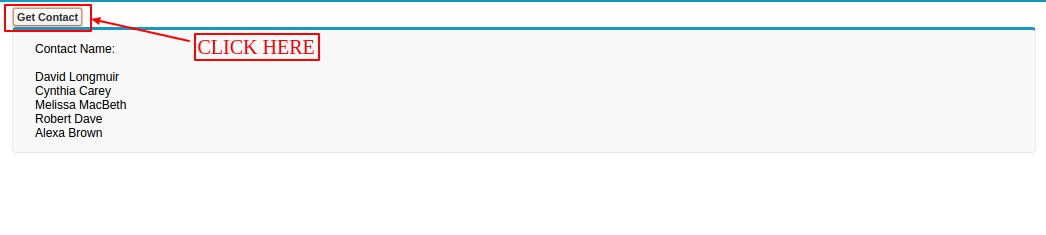
Output
Here is the output:
Support
That’s all for Remote Action function in Visualforce Page, still have any issue feel free to add a ticket and let us know your views to make the code better https://webkul.uvdesk.com/en/customer/create-ticket/

. . .
Be the first to comment.