What is Salesforce OmniStudio?
Salesforce OmniStudio (formerly known as Vlocity) is a low-code digital engagement toolkit designed to help organizations quickly create seamless, customer-centric business applications.
It is a core part of Salesforce Industries, enabling businesses to design guided customer journeys, automate workflows, and integrate multiple data sources without heavy coding.
OmniStudio enables organizations to connect Salesforce data with external systems while delivering personalized, dynamic user experiences across web, mobile, and service channels.
The platform simplifies complex business operations by offering configurable components that accelerate development and improve operational efficiency.
As businesses increasingly adopt digital transformation strategies, OmniStudio plays a crucial role in delivering scalable and flexible enterprise solutions.
Why Businesses Use Salesforce OmniStudio
Firstly, organizations today face growing pressure to deliver faster digital services while managing complex customer requirements.
However, traditional development methods often slow innovation due to heavy coding and system complexity.
Therefore, Salesforce OmniStudio addresses these challenges by providing a low-code development environment that enables teams to build enterprise-grade applications faster.
Key Business Benefits of Salesforce OmniStudio
-
Firstly, accelerates application development using low-code tools.
-
Additionally, improves customer experience through guided workflows.
-
Moreover, supports seamless integration with third-party systems.
-
Furthermore, enhances automation and operational efficiency.
-
Finally, reduces development and maintenance costs.
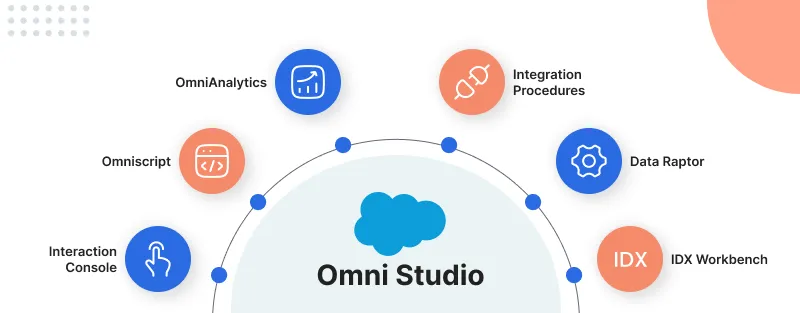
Salesforce OmniStudio
Salesforce OmniStudio, previously known as Vlocity, follows a layered architecture designed to simplify digital experience creation while ensuring efficient data processing and system integration.
OmniStudio Architecture Overview
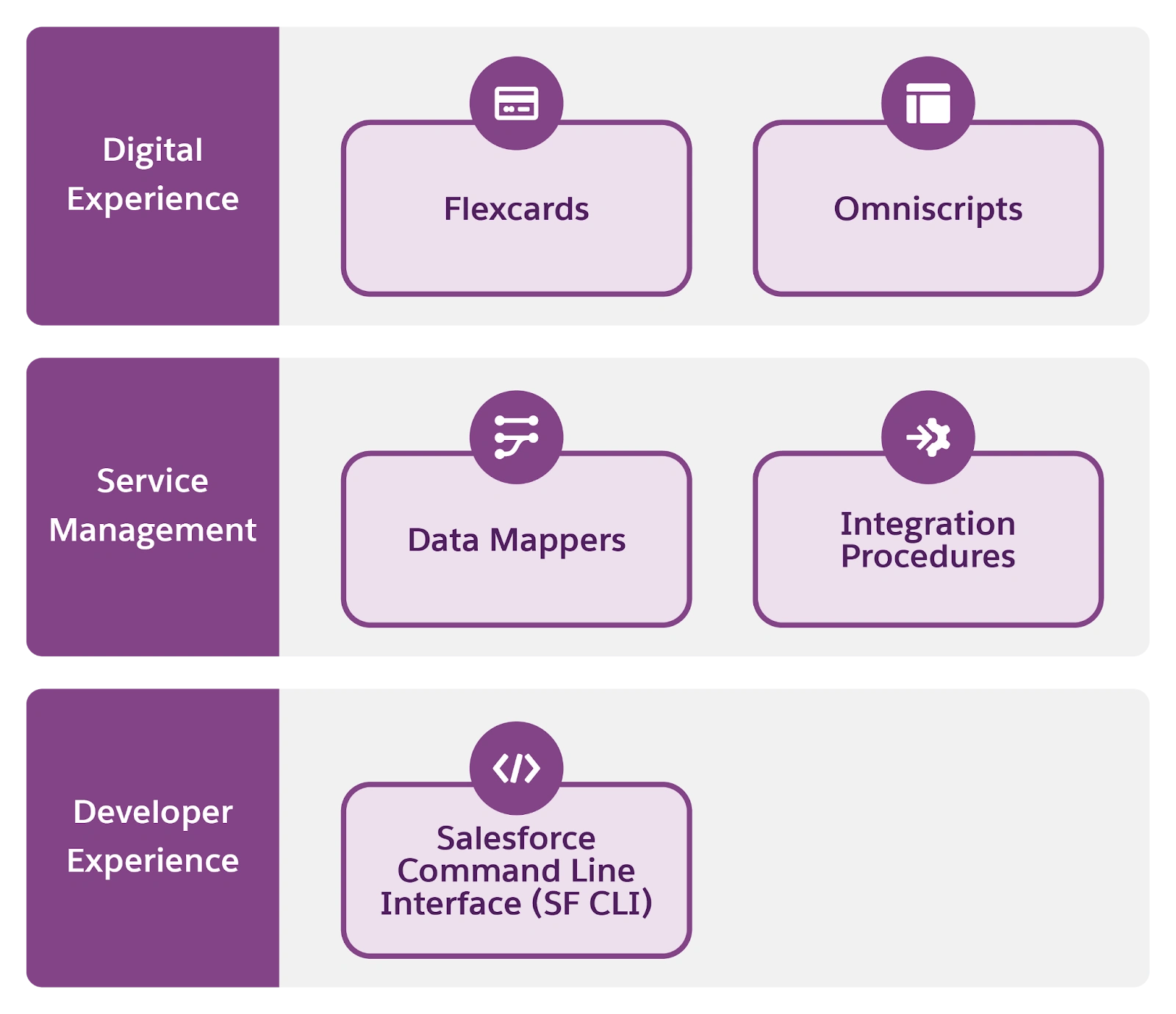
Salesforce OmniStudio architecture consists of three primary layers.
Salesforce OmniStudio Digital Experience Layer
The Digital Experience Layer in Salesforce OmniStudio focuses on building interactive and personalized user interfaces that guide customers and internal users through business processes.
Salesforce OmniStudio FlexCards
FlexCards in Salesforce OmniStudio are dynamic UI components that display real-time data from Salesforce or external systems.
They allow users to view contextual information, perform quick actions, and access important insights without having to navigate multiple screens.
FlexCards are highly configurable and reusable, making them ideal for building dashboards, service consoles, and customer portals.
- Additionally, FlexCards provide several powerful capabilities:
- Firstly, display summarized data in an easy-to-understand card-based layout.
- Additionally, support multiple data sources, including Salesforce objects and external APIs.
- Moreover, allow conditional visibility to show or hide information based on business rules.
- Furthermore, enable embedded actions such as launching OmniScripts, updating records, or triggering workflows.
- Also, provide responsive design support for web and mobile devices.
- As a result, improve agent productivity by presenting contextual information in a single interface.
Salesforce OmniStudio OmniScripts
OmniScripts in Salesforce OmniStudio enable organizations to create step-by-step guided workflows.
It simplify complex processes such as customer onboarding, service requests, or product configuration.
These scripts provide intelligent branching logic that adjusts workflows based on user inputs, ensuring personalized and efficient user journeys.
In addition, OmniScripts offer several advanced workflow capabilities:
- Firstly, break down complex business processes into structured and guided steps.
- Additionally, reduce user errors by validating data input in real time.
- Moreover, support integration with multiple backend systems during workflow execution.
- Furthermore, enable reusable script components to accelerate development.
- Also, allow dynamic decision-making using conditional logic and branching paths.
- In addition, provide seamless user experiences across desktop, mobile, and service channels.
- As a result, improve process automation by reducing manual intervention.
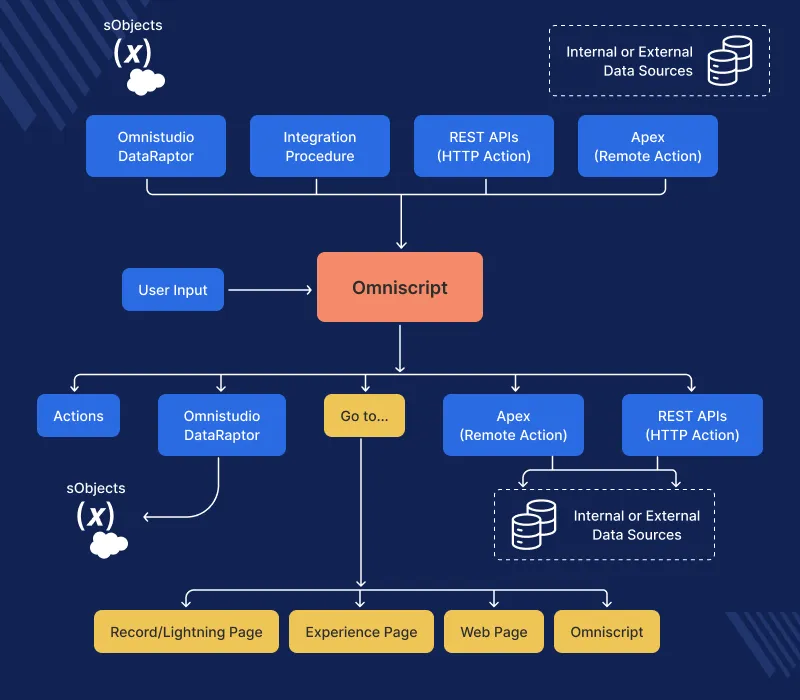
This diagram explains how OmniScript works behind the scenes when a user fills out a form, completes a process, or interacts with Salesforce.
Data Sources & Integrations
At the top of the diagram, OmniScript connects to various internal and external data sources through these components:
- Omnistudio DataRaptor
- Integration Procedure
- REST APIs (HTTP Action)
- Apex (Remote Action)
Notes – These tools allow OmniScript to communicate with Salesforce database (sObjects),
External systems,Third-party APIs.
User Interaction via OmniScript
- The central block is OmniScript.
- User Input – User enters data into a guided form.
- OmniScript then performs different actions based on configuration:
- Calls DataRaptor
- Executes Integration Procedures
- Triggers Apex Remote Actions
- Calls REST APIs
- Performs navigation
Processing & Actions Layer
After user input, OmniScript can:
- Actions
- Standard configured actions within the flow.
- Omnistudio DataRaptor(Updates or retrieves sObject records)
- Apex (Remote Action)
- REST APIs (HTTP Action)
Output & Navigation
After processing, OmniScript can redirect users to:
- Record/Lightning Page → Standard Salesforce object page
- Experience Page → Community/Portal page
- Web Page → External website
- Another OmniScript → Multi-step workflows
Salesforce OmniStudio Service Management Layer
The Service Management Layer in Salesforce OmniStudio handles backend logic, data transformation, and system integrations.
Salesforce OmniStudio DataRaptors (Earlier Known as Data Mapper)
DataRaptors in Salesforce OmniStudio (earlier known as Data Mapper) are data integration tools used to extract, transform, and load data between Salesforce and external systems.
They eliminate the need for custom development by providing configurable data mapping and transformation capabilities.
Types of DataRaptors
- Extract DataRaptor – Retrieves data from Salesforce
- Load DataRaptor – Saves data into Salesforce
- Transform DataRaptor – Modifies and restructures data
- Turbo DataRaptor – DataRaptor Turbo Extract quickly fetches simple data from Salesforce.
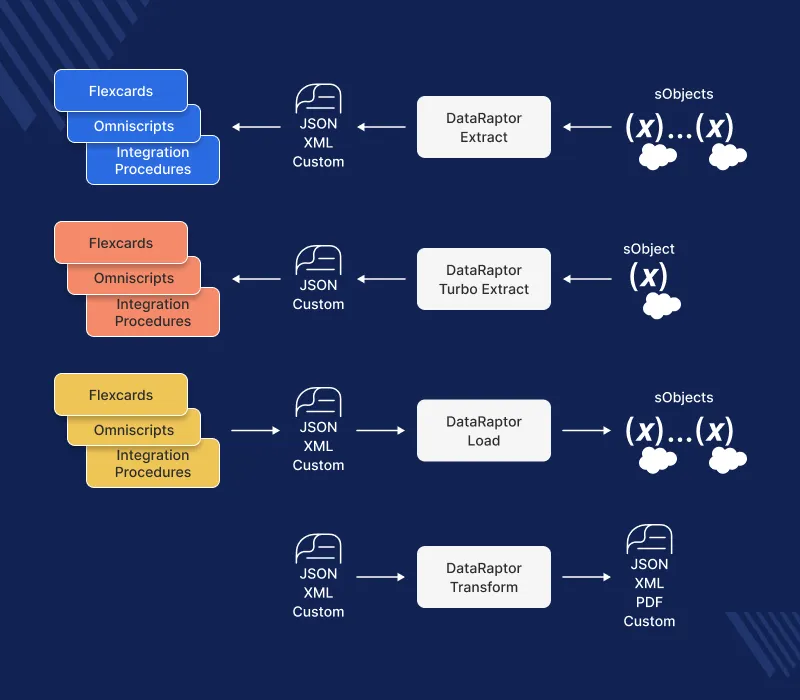
DataRaptor Extract
DataRaptor Extract pulls data from multiple Salesforce Sobjects
The extracted data is converted into formats like JSON, XML, pdf or Custom format.
The processed data is sent to FlexCards, OmniScripts, and Integration Procedures. This step is mainly used to retrieve and display Salesforce data.
DataRaptor Turbo Extract
DataRaptor Turbo Extract quickly fetches simple data from Salesforce.
The data is converted into JSON or Custom format.
The data is delivered to FlexCards, OmniScripts, and Integration Procedures. This step is used when faster and lightweight data retrieval is required.
DataRaptor Load
DataRaptor Load processes this incoming data.
The processed data is then saved or updated inside Salesforce sObjects. This step is used to store user or system data in Salesforce.
DataRaptor Transform
Data is received in formats like JSON, XML, or Custom format.
DataRaptor Transform converts or restructures data into another required format.
The final output can be generated as JSON, XML, PDF, or Custom format. This step is used when data needs formatting or conversion before sending to another system.
Integration Procedures
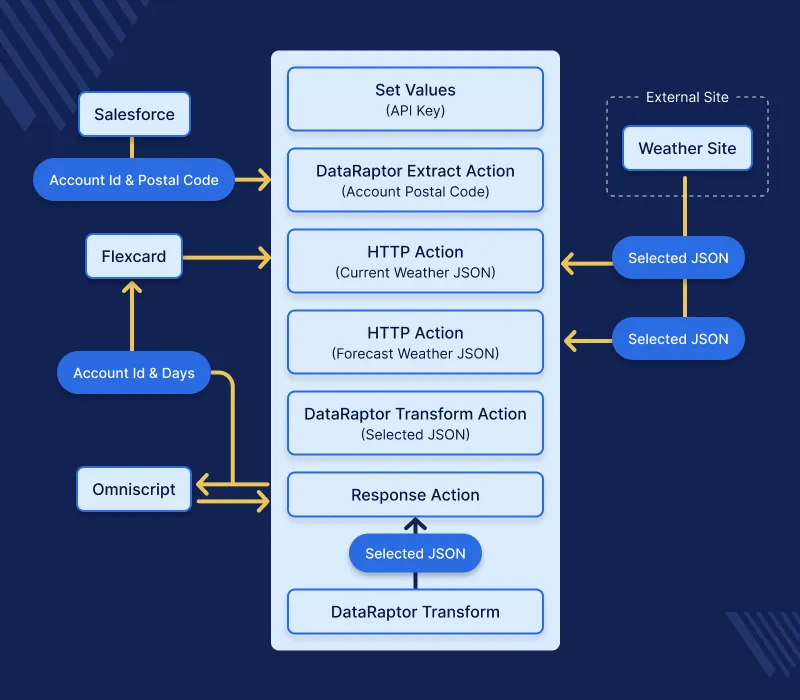
Salesforce OmniStudio Integration Procedures are server-side processes that combine multiple service calls into a single API request.
They help reduce system load, improve performance, and ensure faster data processing within the Salesforce OmniStudio framework.
At a beginner level, Salesforce OmniStudio Integration Procedures work like a central coordinator that collects data from multiple sources, processes it, and sends the result back in one response.
This helps avoid multiple API calls and makes applications run more efficiently.
Why Salesforce OmniStudio Integration Procedures Are Important
- Firstly, they help reduce the number of server requests, improving system speed.
- Additionally, they enable faster data processing by combining multiple operations into one flow.
- Moreover, they help connect multiple systems and APIs in a structured and scalable way.
- As a result, they improve overall performance and user experience in Salesforce OmniStudio applications.
Let Suppose a customer service application needs customer details, order history, and payment status.
Instead of calling three separate APIs, Salesforce OmniStudio Integration Procedures collect all this information in one request and provide a single response to the application.
Developer Experience Layer
The Developer Experience Layer supports deployment, version control, and lifecycle management of OmniStudio components.
IDX Build Tool
The IDX Build Tool allows developers to convert OmniStudio configurations into version-controlled packages, ensuring smoother deployment across environments.
IDX Workbench
IDX Workbench simplifies the migration and management of OmniStudio data packs between development, testing, and production environments.
Key Features of Salesforce Omnistudio
Low-Code Development Environment
OmniStudio allows developers and administrators to build applications using drag-and-drop configuration tools, reducing dependency on traditional coding.
Reusable and Modular Components
The platform supports reusable components, which accelerate development and ensure consistency across applications.
Multi-System Integration
OmniStudio connects Salesforce with external systems, APIs, and databases, enabling unified data management.
Industry-Specific Solutions
Salesforce provides prebuilt industry data models and workflows tailored for healthcare, financial services, telecommunications, and public sector organizations.
Enhanced Customer Experience
OmniStudio enables organizations to create personalized and guided digital experiences that improve customer satisfaction and engagement.
Real-World Use Cases of Salesforce Omnistudio
Organizations across industries use Salesforce Omnistudio to automate complex business workflows and improve digital engagement.
Customer Onboarding Automation
Companies use OmniScripts and DataRaptors to streamline onboarding processes while collecting and validating customer information.
Service Request Management
OmniStudio enables guided service request workflows that reduce resolution time and improve service quality.
Product Configuration and Quoting in Salesforce Omnistudio
Businesses use OmniStudio to build interactive product configuration tools that provide accurate pricing and product selection.
Self-Service Portals
Organizations create self-service portals that allow customers to manage accounts, track orders, and submit service requests independently.
Scope of Salesforce Omnistudio
With the growing adoption of low-code platforms, Salesforce Omnistudio is becoming a critical component in digital transformation strategies.
It allows organizations to build scalable applications, automate business operations, and improve customer experiences while reducing development complexity.
As Salesforce continues to enhance automation, AI, and industry cloud solutions, Salesforce Omnistudio is expected to play a significant role in delivering next-generation digital experiences.
Conclusion: Why Salesforce Omnistudio Matters
Salesforce Omnistudio is a comprehensive low-code toolkit that enables businesses to design digital customer experiences, automate workflows, and integrate multiple data sources seamlessly.
Its layered architecture, reusable components, and integration capabilities make it a powerful solution for organizations seeking faster and more efficient application development.
By adopting Salesforce Omnistudio, businesses can accelerate innovation, enhance customer engagement, and streamline operations within the Salesforce ecosystem.
Ready to Streamline Your Development? Unlock development with eShopSync’s ultimate solutions.
Contact us today and take the next step toward seamless digital innovation.
FAQs
What are the main components of OmniStudio?
OmniStudio mainly includes four key components:
OmniScript – Creates step-by-step guided user workflows.
FlexCards – Displays important data in an interactive card format.
DataRaptors – Extracts, transforms, and loads data quickly.
Integration Procedures – Combines multiple API calls into a single request to improve performance.
How is OmniStudio helpful for businesses?
OmniStudio helps businesses automate workflows, improve customer experiences, and reduce development time.
It also allows organizations to connect multiple systems and provide faster and more personalized services to customers.
Is OmniStudio a low-code or no-code tool?
OmniStudio is mainly a low-code tool. It allows users to build applications using drag-and-drop components, but some advanced customizations may require technical knowledge.
Can OmniStudio integrate with external systems?
Yes, OmniStudio supports integration with external systems such as eCommerce platforms, ERP systems, and third-party APIs using Integration Procedures and DataRaptors.
Who should learn Salesforce OmniStudio?
OmniStudio is useful for Salesforce developers, administrators, consultants, and businesses looking to automate customer journeys and improve system integrations.
. . .

Be the first to comment.